BabyRF
Description
I made a nice flag for our beginner challenge but I accidentally dropped it and it broke into pieces. I collected them all into this cozy little .wav file for you to find!
The flag consists of six case-sensitive parts. The fourth part is all uppercase.
Files provided: BabyRF.wav
Approach
The challenge involves analyzing an audio signal containing flag fragments hidden across different layers.
The flag was assembled sequentially by solving six distinct parts:
- Audible Analysis (Parts 1 & 2): The first part comes from simply listening to the audio. The next part is spoken backwards, so reversing that portion of the audio in Audacity makes it intelligible. Together they yield
L3AK{4uD10_S1gNaL_. - Spectrogram View (Part 3 & 4): Opening the file in Audacity's Spectrogram multi-view exposes visual text
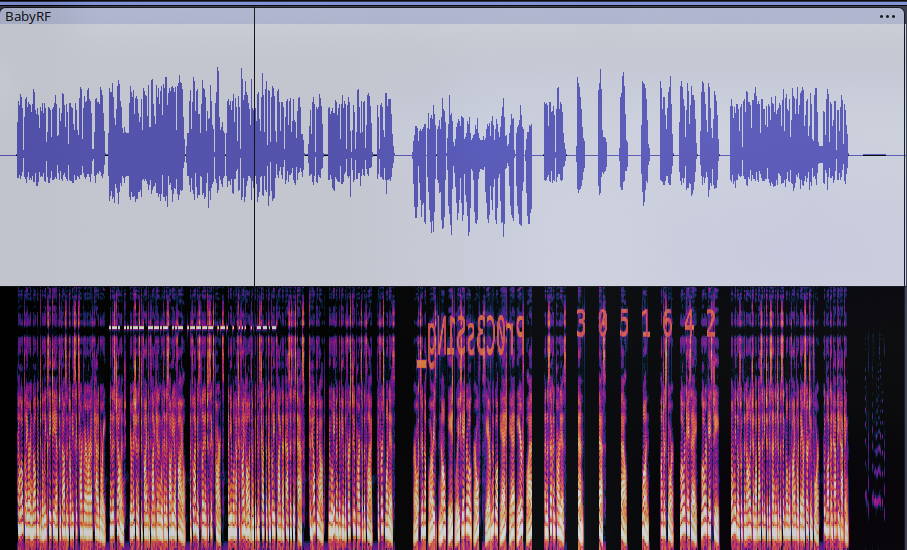
Pr0C3sS1Ng_along with visual Morse code. Decoding the Morse code givesR3QU1RES_(the 4th part, matching the hint of being all uppercase). - Sample Rate Adjustments (Part 5): A strange string of numbers
3051642appears visually in the spectrogram. Lowering the sample rate reveals the real numbers31337_(definition of guessing). - Signal Amplification & Time-Stretching (Part 6): An apparently silent section at the end contains a heavily attenuated high-frequency waveform. Amplifying the region and slowing down playback speed makes the final piece audible:
5K1LLs}.
Technical Analysis
Signal & Audio Forensics
- Spectrogram Analysis: Visual inspection using Audacity Spectrogram mode to identify low-frequency visual cues and hidden Morse code channels.
- DSP / Audio Manipulation: Reversing a spoken segment, sample-rate pitching, amplitude gain adjustment, and time-stretching.
- Tooling Used: Audacity, CyberChef.
Execution Steps & Spectrogram Findings
1. Listening, Reversing & Spectrogram Inspection
Playing BabyRF.wav normally gives the first fragment. The second one is spoken backwards, so I selected that part of the track in Audacity and reversed it to make it intelligible. I then switched the track view to Spectrogram, which rendered hidden text and Morse code embedded in the frequency plot:
2. Decoding Morse Code & Visual Text
- Morse Code:
.-. ...-- --.- ..- .---- .-. . ... ..--.-decoded toR3QU1RES_. - Visual Text:
Pr0C3sS1Ng_was visible on the upper frequency axis. - Current Flag Progress:
L3AK{4uD10_S1gNaL_Pr0C3sS1Ng_R3QU1RES_
3. Sample Rate Pitch Adjustment
The initial visual text 3051642 was kinda strange. I tried lowering the project sample rate which rendered the characters 31337_:
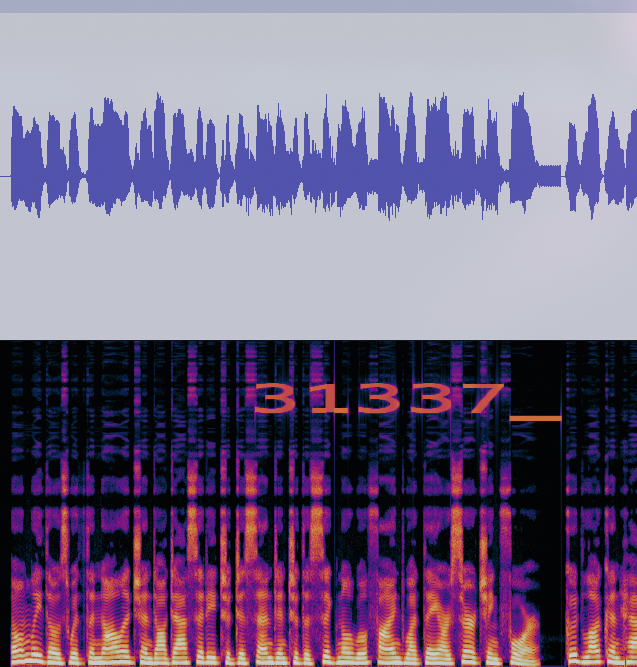
31337_.4. Amplifying Silent End Sequence
Analyzing the tail end of the waveform revealed an anomaly with near-zero amplitude:
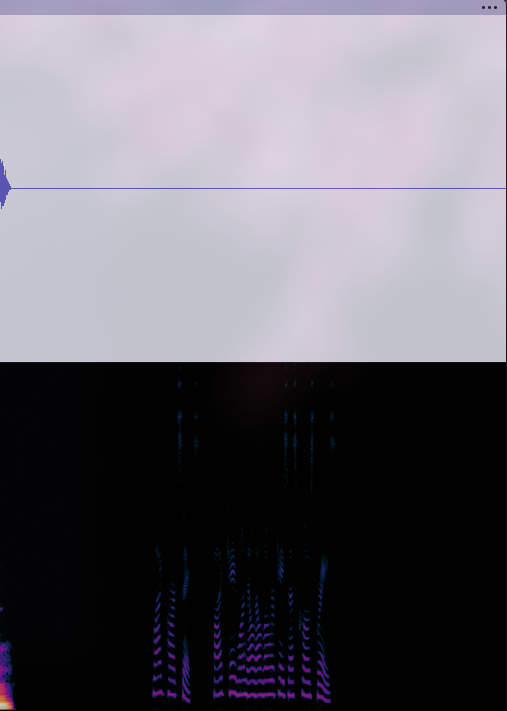
Applying a +20dB Gain / Amplify effect brought out the hidden high-pitch audio stream:

Slowing down the playback speed by 50% made the speech intelligible, giving the final piece: 5K1LLs}.
Flag
L3AK{4uD10_S1gNaL_Pr0C3sS1Ng_R3QU1RES_31337_5K1LLs}